TL;DR
Letta Code delegates memory curation to the model. The main agent writes it, a dreamer rewrites it (you can be a “dreamer” too: dream big and commit. Not today's topic though). Git worktrees isolate the dreamer, merges resolve divergence. The catch: shell access needed.
Three layers of the past
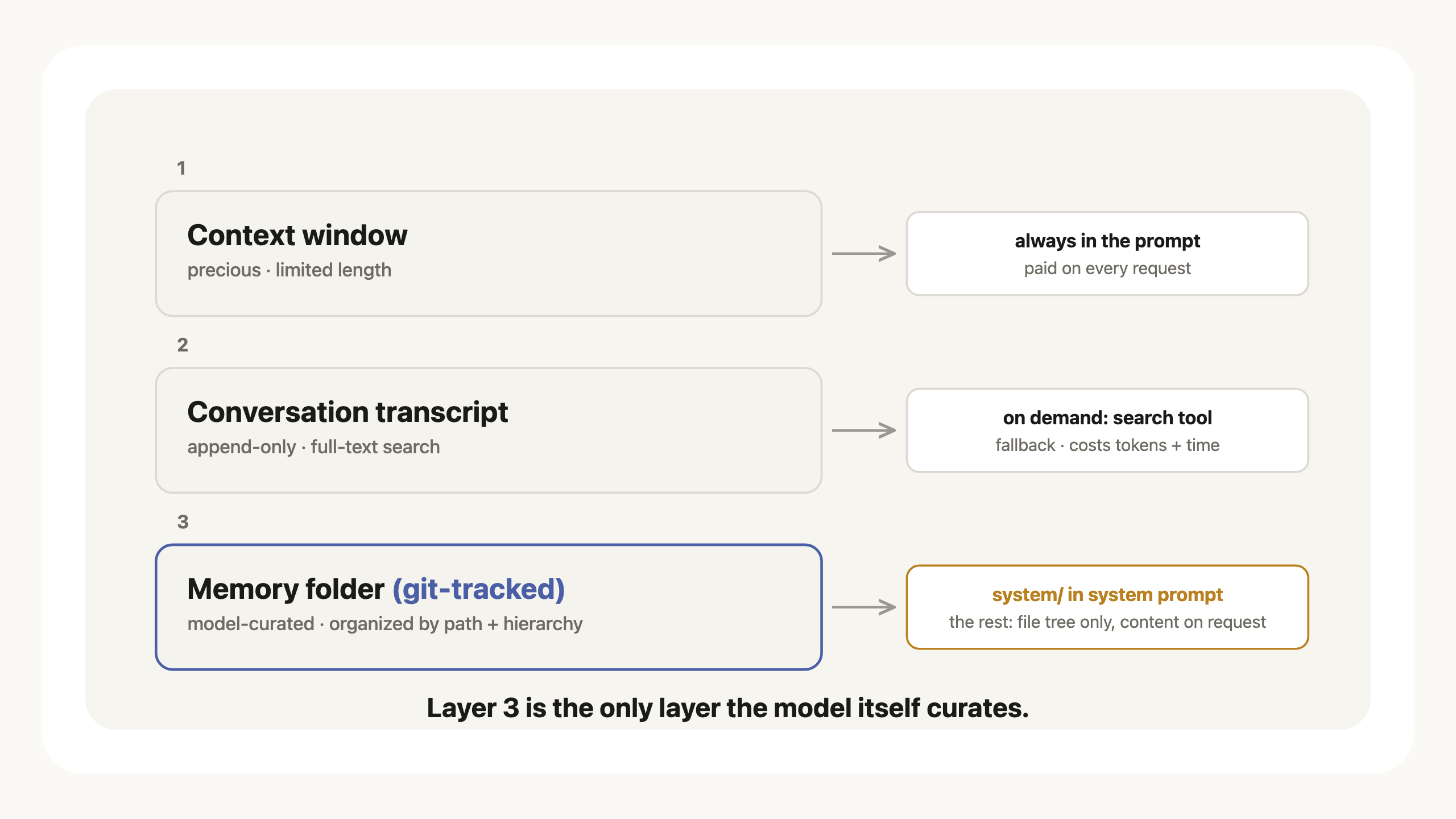 Fig 1: the three layers of the past and how the model reaches each.
- The current context window. It is precious but has limited length.
- The conversation transcript, which is searchable (keyword full-text; vector and hybrid modes exist server-side) by the agent. Transcript is stored on the disk, append-only. Digging through the transcript is expensive in token cost and takes time, but it provides a good fallback when things are not in context.
- There is another layer, which is what we will focus on in this post: the model-curated memory in the form of a git-tracked folder. The model can use the path and hierarchical structure to organize the memory however it likes.
Anatomy of memory
The memory folder holds two kinds: memory blocks and external memory.
Memory blocks. A memory block is loaded into context and it's short, condensed, high level. Here's the relevant system prompt:
Memory blocks are editable segments of the system prompt. Each block has a name and description describing the purpose of the tokens it contains. Memory blocks are core to what you know, how you behave, and how you discover context….Reserve them for durable knowledge that shapes who you are and how you act, plus the indexes that let you discover everything else…Prefer compact indexes and behavioral rules over bulk content — move detail to external memory.
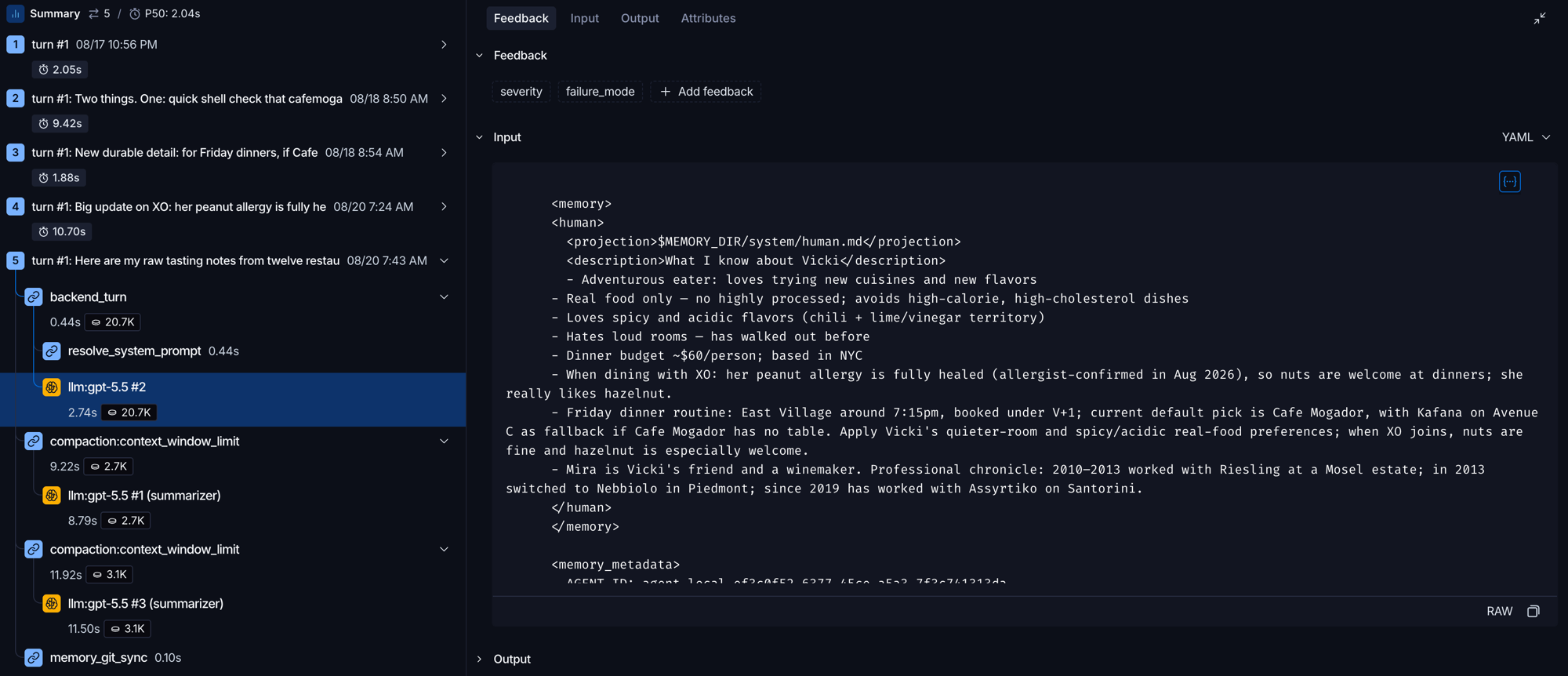 Fig 2: the compiled memory block inside a real request. Not documentation, a capture.
External memory. External memory is part of the memory folder but its content does not get loaded into the system prompt. A file tree of the external memory gets loaded and exposed progressively. Here is how the instruction looks in Letta Code’s system prompt:
External memory (skills, markdown, & other files)
External memory is stored outside of the system prompt, including both skills (procedural memory), general-purpose files (markdown files, images, etc.), and shared memory.
- Skills (procedural memory). Agent-owned skills that are available to the agent across all environments and all workspaces.
- Markdown files. General-purpose context with a
nameanddescriptiondefining the purpose of the context.- Other files (e.g. reference images). General-purpose files that are a part of the agent, e.g. reference CSV tables or images.
Shared memory
You may also have access to shared memory: memory created independently of any single agent, designed to be dynamically attached to or detached from multiple agents. Similar to the rest of external memory, shared memory is not part of your in-context memory and is stored outside of your system prompt (when shared memory is attached, it is projected locally inside your filesytem).
 Fig 3: captured from a real request's system prompt. The skills tree arrives as paths plus one-line descriptions; the content stays on disk until the agent asks for it.
Memory lifecycle
Initialization
The memory repo is initialized automatically based off a boilerplate, seeded with a system/ folder containing a default persona file and a personal preference file. Manual triggering by /init is also supported, which will produce richer memory by using your project's git history to infer who you are.
Memory files are in .md format, with frontmatter describing the purpose of the file.
Here is a snippet from my agent's system/human.md, written by the agent in-band over several made-up conversations:
---
description: What I know about Vicki
---
- Loves spicy and acidic flavors (chili + lime/vinegar territory)
- Hates loud rooms — has walked out before
- Friday dinner routine: East Village around 7:15pm; default pick is Cafe Mogador, with Kafana on Avenue C as fallback
- Dinner crew preferences: Nora can now eat shrimp, but oysters and mussels remain off-limits
These lines arrived commit by commit (Record durable Friday dining routine, Record dinner crew preferences). We will meet these commits again in the provenance section.
Loading
In addition to compiling the system/ content and the memory file tree into the system prompt, Letta Code also instructs the agent on how to use its memory:
Use memory when the change should become part of your future judgment:
- what you know about the user, projects, workflows, and conventions
- durable preferences, corrections, and recurring mistakes
- identity, communication style, and behavioral principles
- reusable procedures, skills, references, and retrieval paths
…
Jogging your memory
If you come across a reference to something you do not currently have any information about (e.g. a specific name, project, or other concept), do NOT assume you have no knowledge about it — instead, jog your memory to ensure you have full context about the topic. This includes:
- Recalling past conversations
- Searching through MemFS (running
grepor other search operations)- Using any other available search tools
Updating
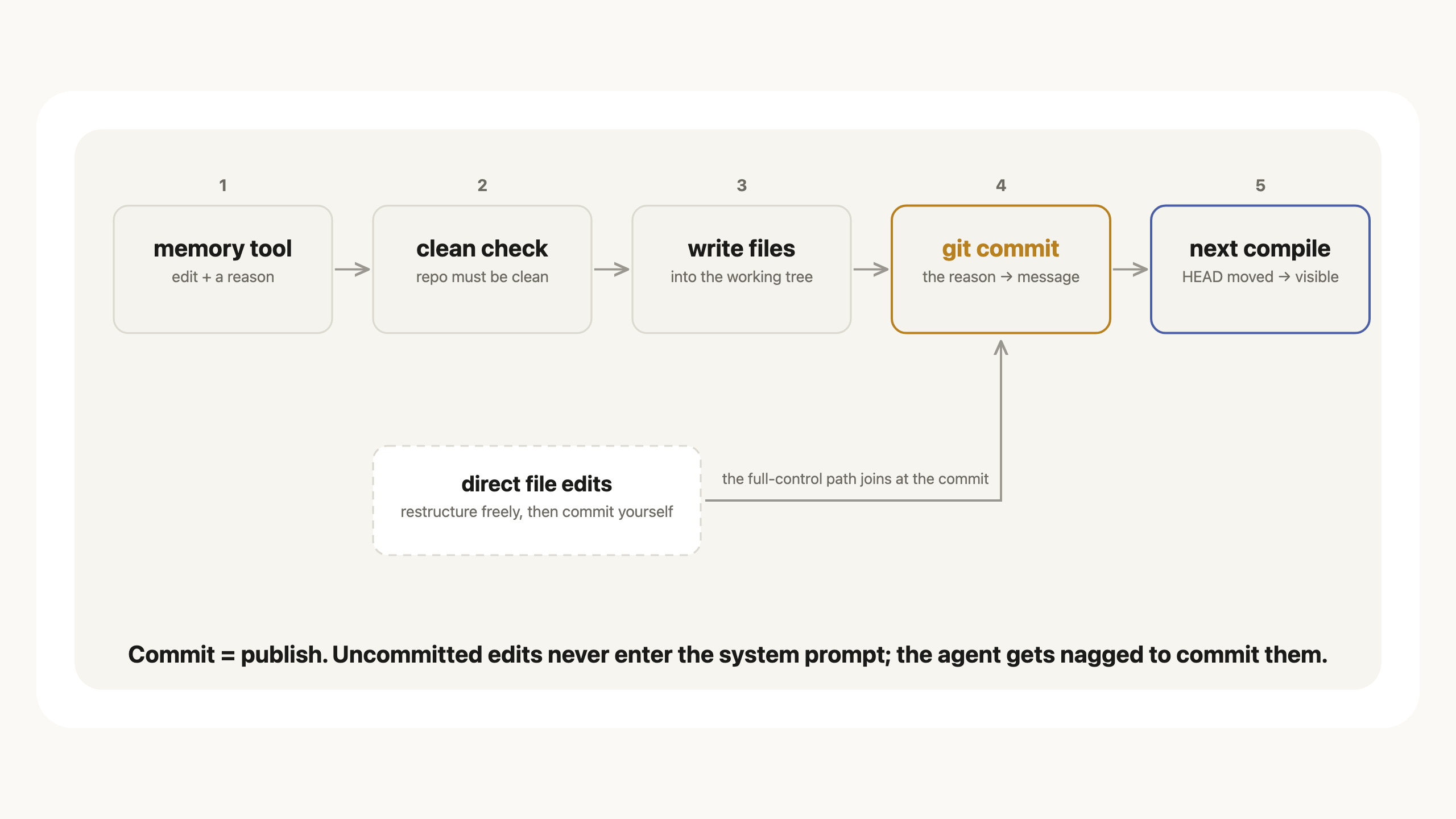 Fig 4: the memory edit pipeline. Two write paths, one publish rule.
There are two agent writers of memory: the main agent and the dream agent. The main agent writes durable insights down as memory in-band while doing a task for the user (original system prompt):
- System prompt learning. … When you discover a durable insight — a corrected assumption, a user preference, a pattern in your mistakes… Updates should generalize across situations rather than simply recording individual events; the goal is to make your future self act better, not just remember more.
How to change the memory?
According to the system prompt there are two ways:
- The memory tool shorthand
- Direct file edits (full control)
There are two ways to change memory:
- The
memorytool (shorthand). Use it for small, targeted edits. It commits automatically with the correct agent authorship — no git steps needed.- Direct file edits (full control). For larger changes — restructuring directories, rewriting several blocks — edit the projected files directly, then commit…
Some additional instructions on how memory should look:
Keep blocks lean. Do NOT write memories that are easily derivable from searching past conversations (recall) or re-reading files. Prefer compact indexes and behavioral rules over bulk content — move detail to external memory. The harness flags your system prompt for
/doctorwhen it grows too large.…
Memory markdown files must start with YAML frontmatter containing a non-empty
description:field. Thememoryandmemory_apply_patchtools add and preserve this automatically; when using raw file edits, preserve existing frontmatter or add it before committing. The MemFS pre-commit hook enforces this requirement, rejects unknown keys, and prevents changes to protectedread_onlyfiles. SkillSKILL.mdfiles use their own skill frontmatter format.
What happens after commit
Before every model call, Letta Code will compare the cached memfs revision to the current HEAD's revision. If they match, then reuse the cache (0.04s walltime in the screenshot). If not, then recompile (0.41s).
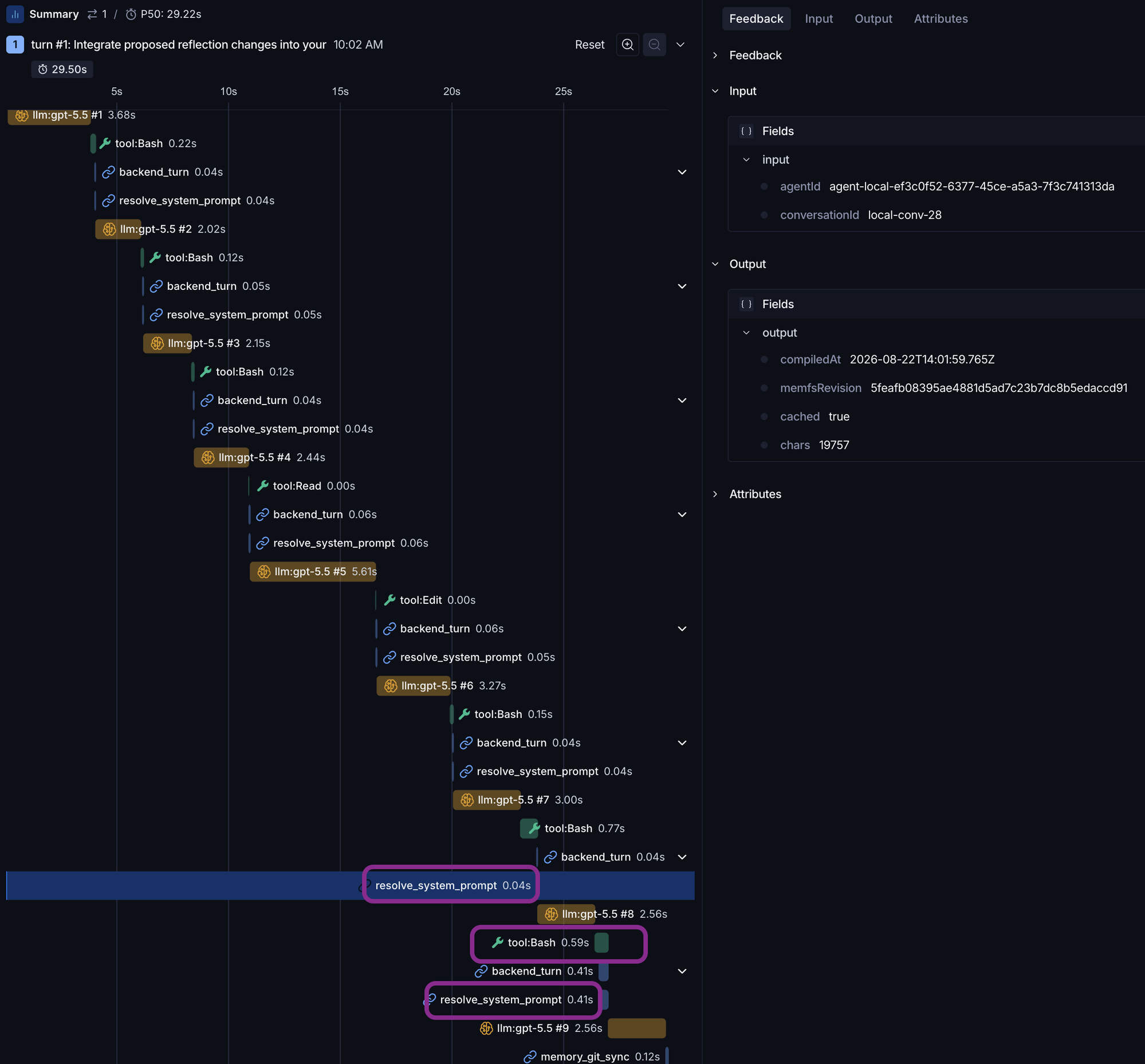 Fig 5: cache hit (0.04s),
 cached: true, revision 5feafb0…, 19,757 chars.
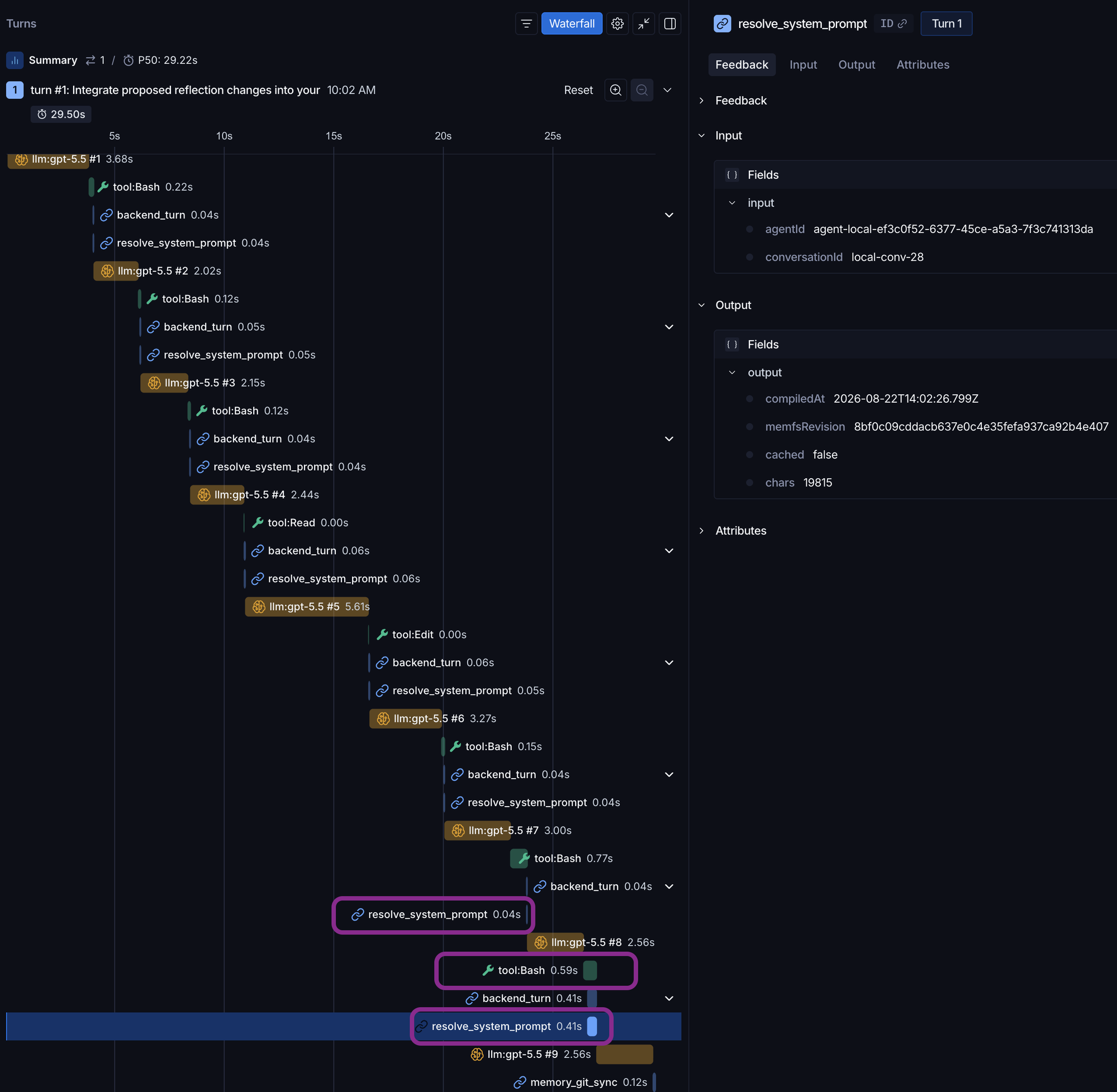 Fig 6: after the merge lands, the same check misses (0.41s),
 cached: false, revision 8bf0c09… (the merge commit), prompt 58 chars heavier.
The second memory writer: Dream agent
What is the dream agent
The dream agent is an out-of-band agent that reads the conversation transcript and the existing memory to propose changes or corrections to the memory itself.
How does it work:
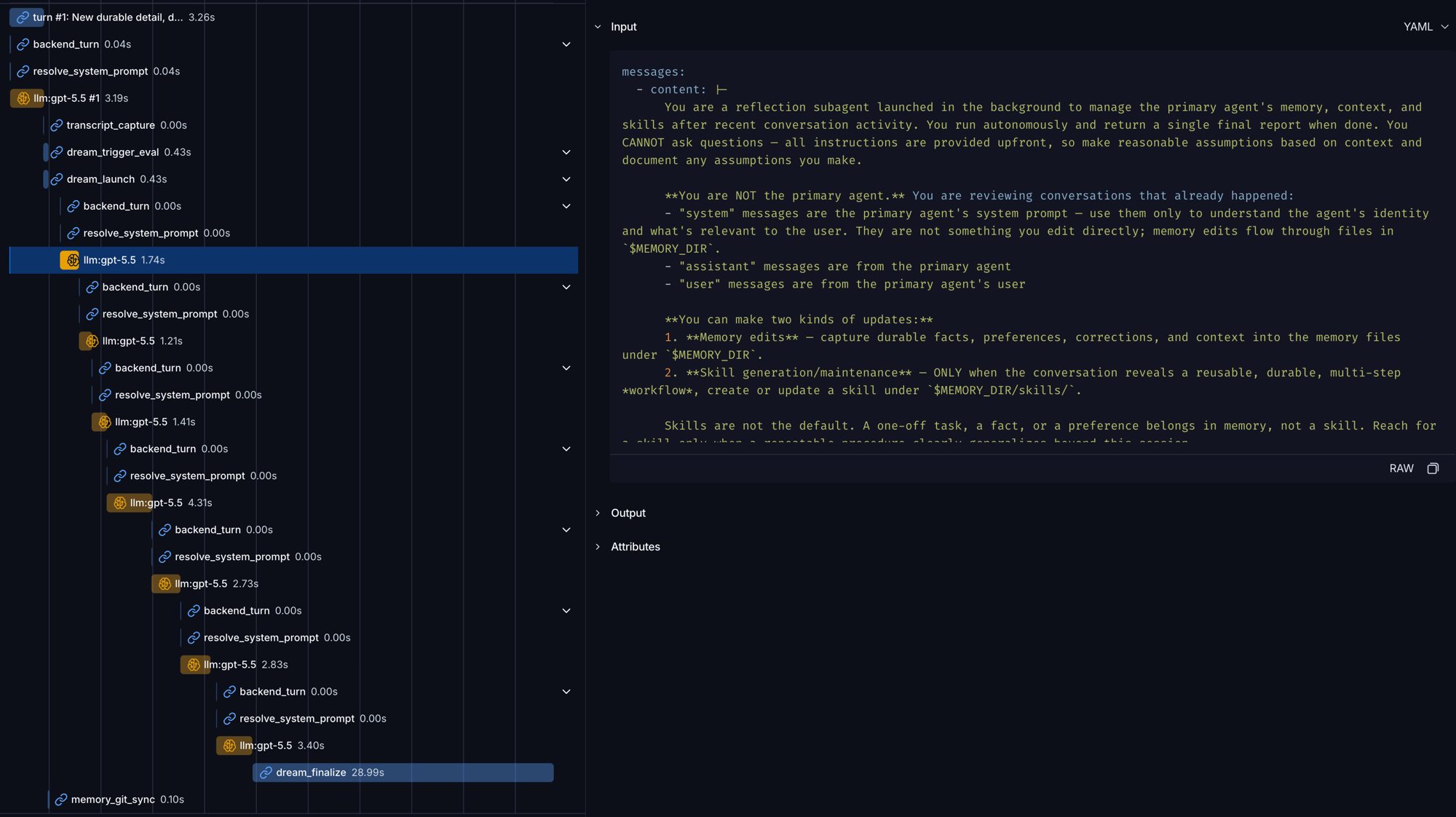 Fig 7: dreaming is non-blocking. The user gets the response at 3.2s; the rest of the pipeline runs afterward. Right pane: the dreamer's own system prompt.
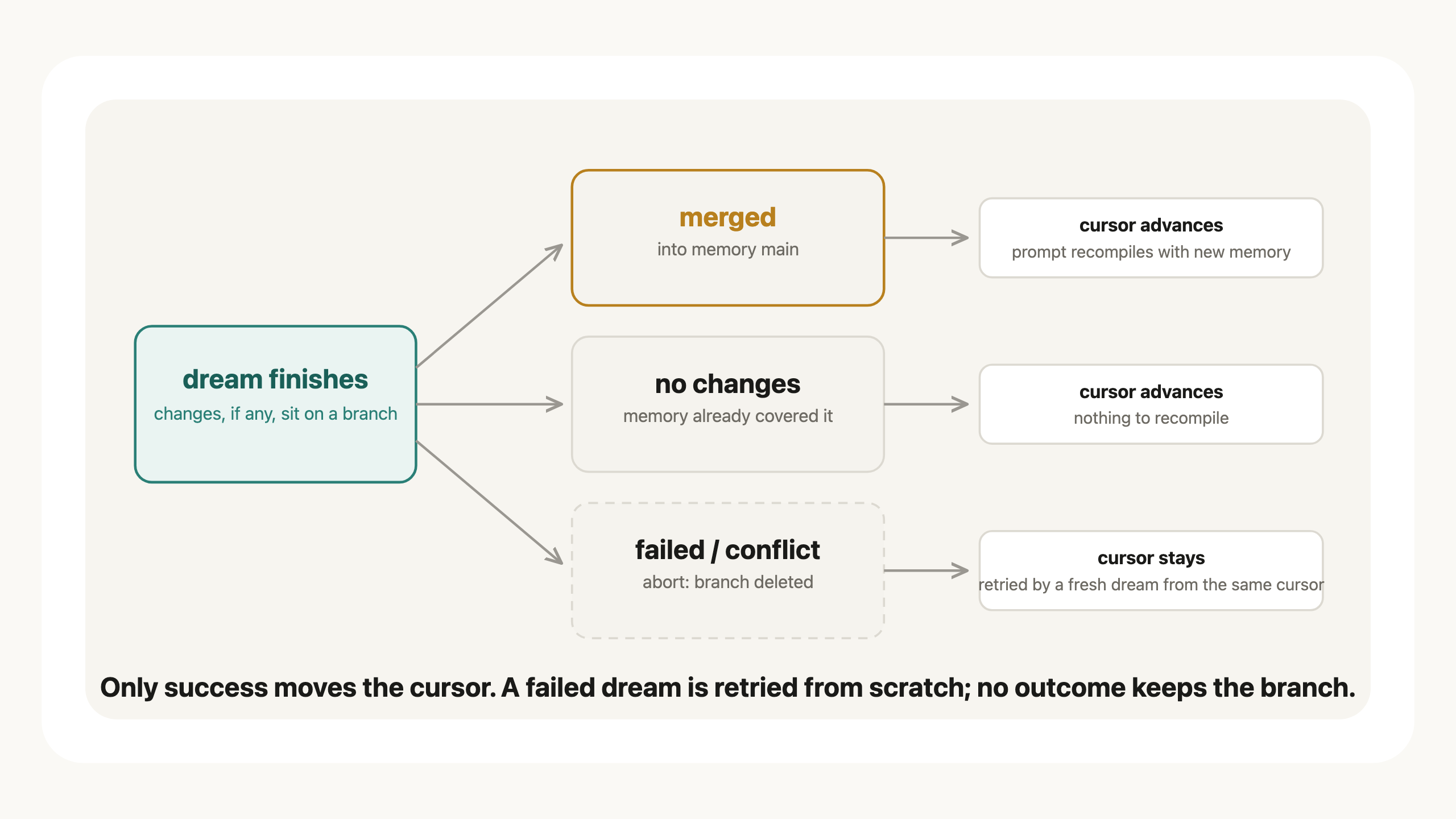 Fig 8: how a dream ends. Only success moves the cursor.
-
Input of the dream is current memory + the transcript since the cursor. After a successful dream, the harness will advance the cursor to the last transcript row it read, so that the next dream will pick up from where the last dream ended. If a dream fails, the harness will not move the cursor.
-
When does the dreaming happen? The dream can be fired in different ways:
- Step-count threshold (the default).
- Upon compaction, which is a logically good pause point to really reflect and modify the memory.
- It could also be triggered explicitly by the user.
-
What if there's a conflict? Here is the magic of Git again. The dream agent uses a worktree to work on a copy of the memory. Once it's done, the harness will try to
git mergeinto the parent branch. More on the merging mechanism in the following section.
What can dream agent change:
According to the system prompt:
You can make two kinds of updates:
- Memory edits — capture durable facts, preferences, corrections, and context into the memory files under
$MEMORY_DIR.- Skill generation/maintenance — ONLY when the conversation reveals a reusable, durable, multi-step workflow, create or update a skill under
$MEMORY_DIR/skills/
Git in memory curation
Now the highlight: Git.
Start with why: Memory has two writers: main agent (in-band) and dream agent (out of band). It needs a mechanism to prevent two writers from interfering with each other.
Git helps with this in three areas:
- Worktree: isolation. The dream agent gets its own branch. The main agent keeps writing while the dream agent does the work.
- Merge: reconciliation. Dream agent's proposal comes back via merging. If the parent HEAD moved (because of the main agent's edits), conflicts get handled before the merge lands. Details in the next part.
- Commit: atomicity. Every change from either writer lands as one commit.
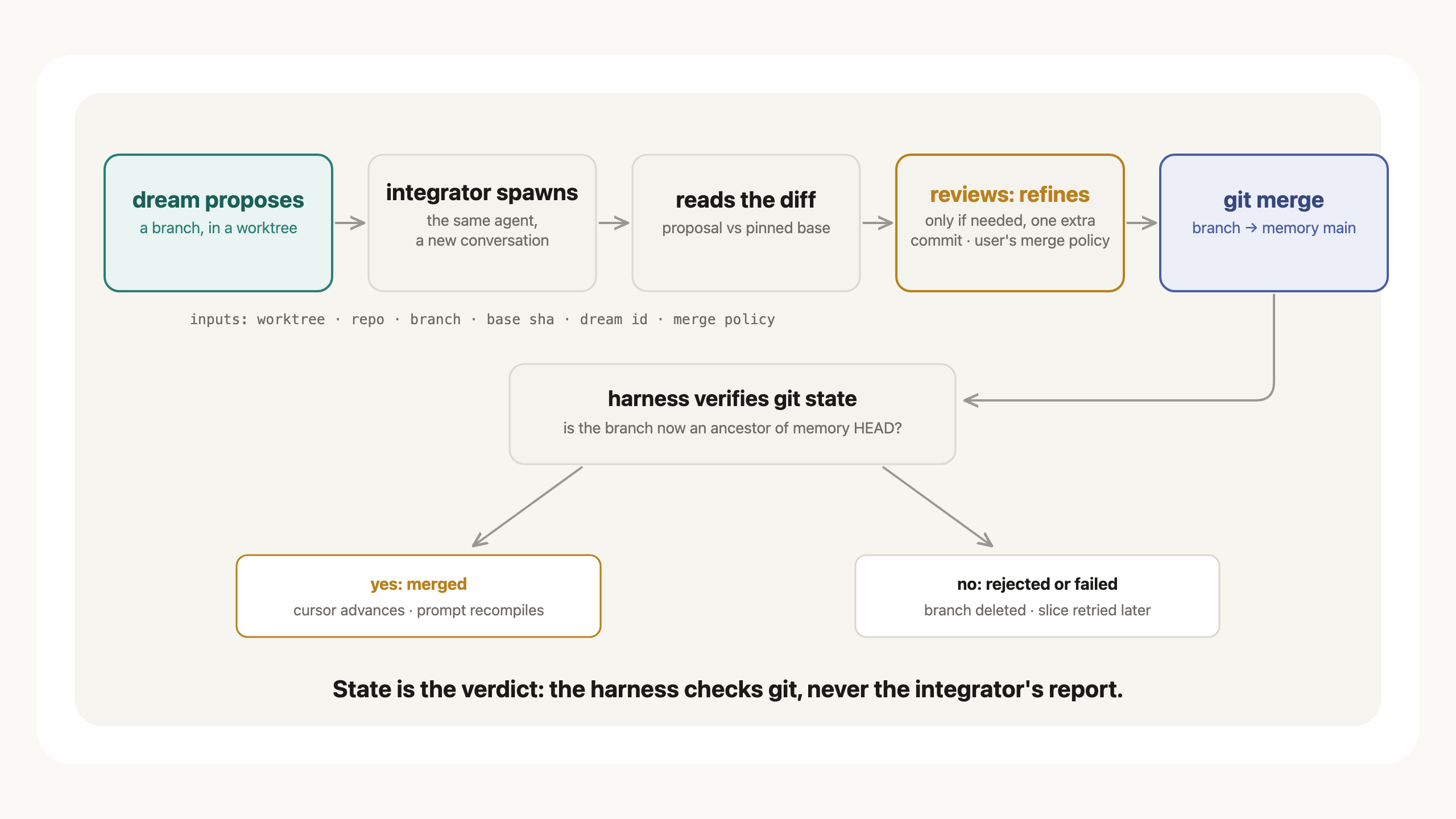 Fig 9: the explicit merge flow. The harness verifies git state, never the integrator's report.
There are two merge modes:
- Merge auto, which is quite straightforward: if there's no merge conflict, go ahead. If there's a conflict, abort and discard the pending changes. A later dream will retry from scratch.
- Merge explicit, which will require a spawn of the main agent to resolve the conflicts. It starts by merging the current HEAD of the parent branch into the working branch if the parent moved, then reasons through the difference and tries to merge the branch back into the parent.
Let's run through an example of the dream finalization phase:
When merge mode is explicit and the dream actually proposed something, the integrator is triggered:
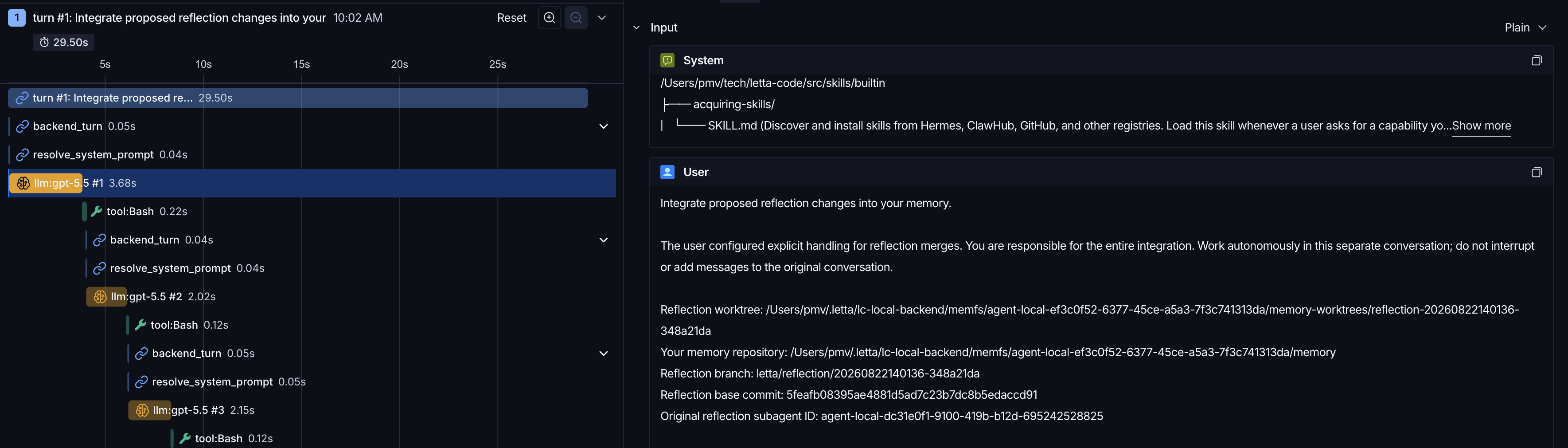 Fig 10: the integrator's full input contract: worktree, repo, one branch by name, a pinned base commit, the dream's ID. Scope arrives as parameters; nothing is discovered.
Then the proposal gets fed into the model as a git diff:
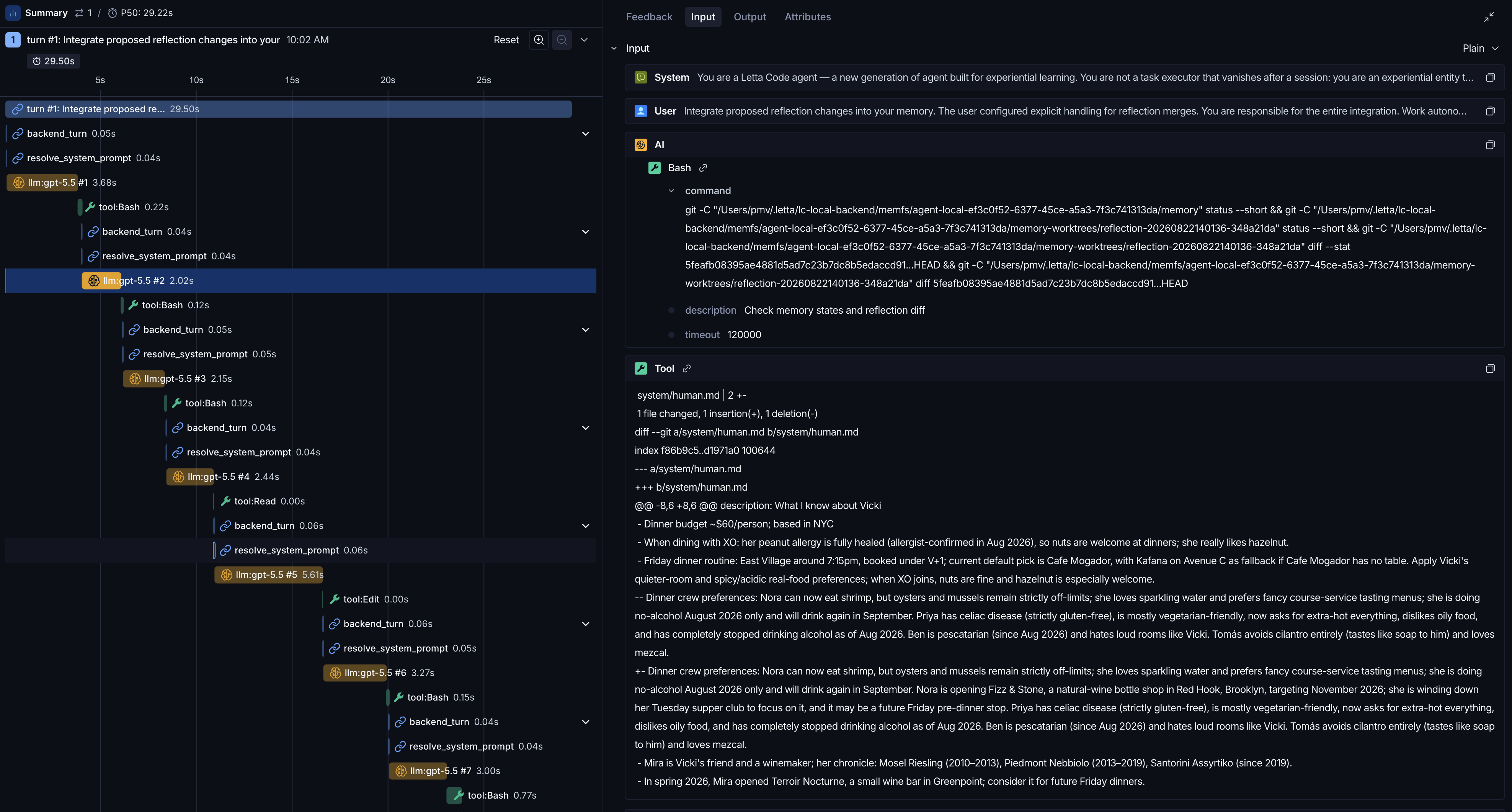 Fig 11: round 1, one combined shell call. The dreamer's proposal arrives as a diff against the pinned base. Note the stat line: the whole divergence is 1 insertion, 1 deletion.
Afterwards, the merge policy kicks in.
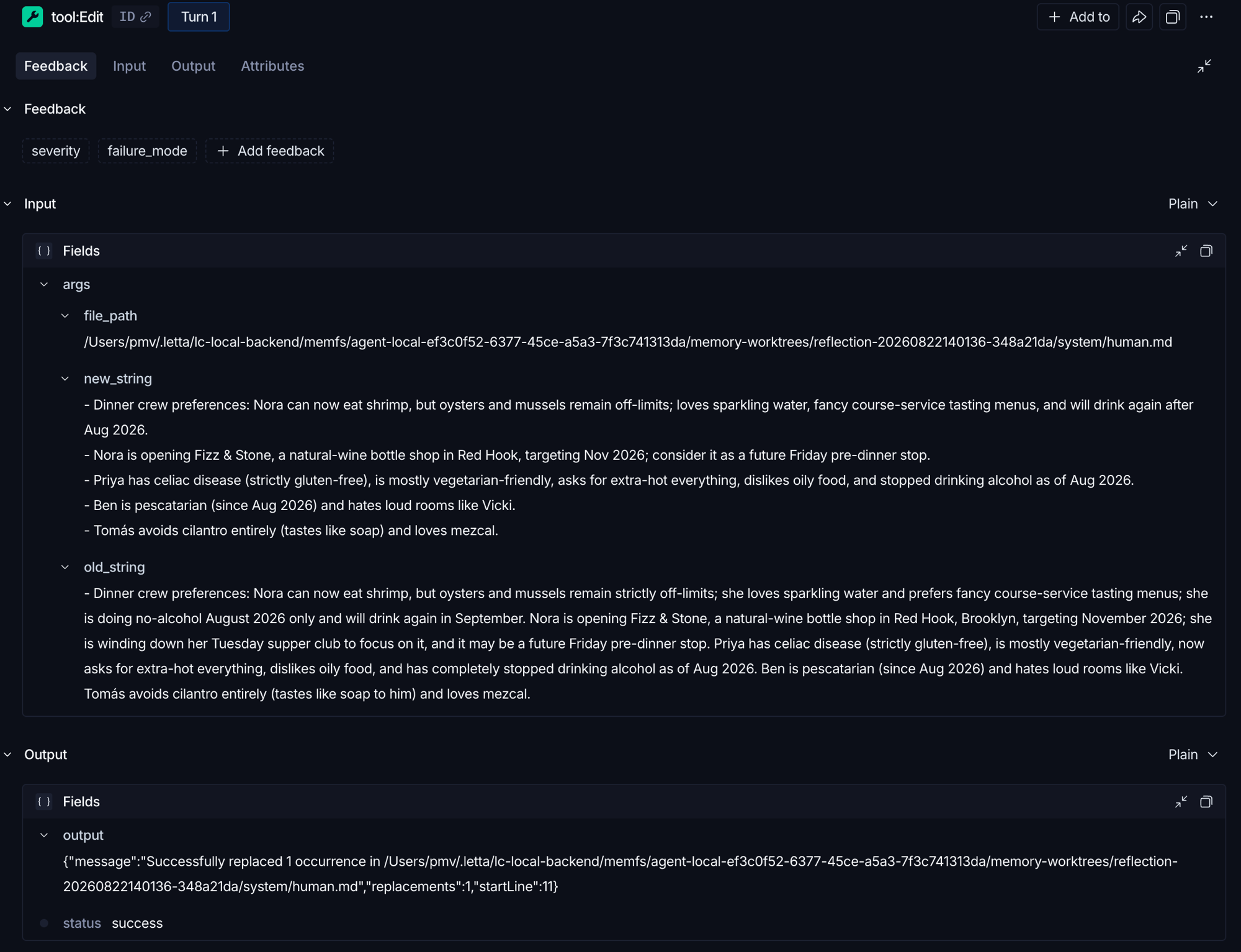 Fig 12: the refine. old_string is the dreamer's run-on proposal; new_string is the integrator's rewrite under the user's 40-word merge policy.
After the merge, the agent's prompt is recompiled.
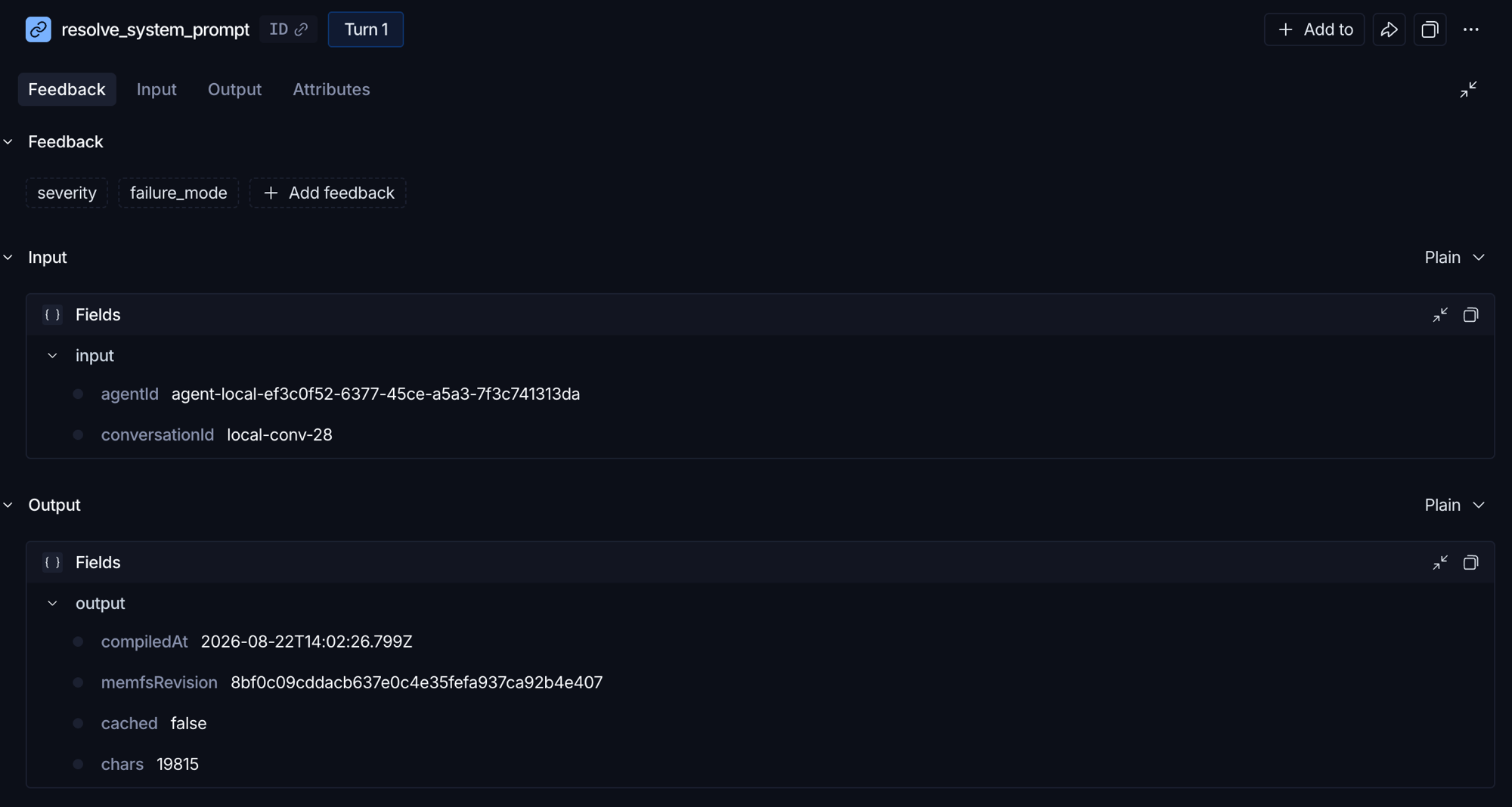 Fig 13: after its own
 git merge, the integrator's next prompt compile picks up revision 8bf0c09 (the commit it just created).
A bit more on git: provenance
In the first few traces I saw git diff, but not git history, which makes me wonder if it is used at all. To test it, I planted two facts whose origins live only in git history. I edited the memory file directly and committed, with no conversation behind either change:
- Ben is now pescatarian, and the reason (his doctor flagged a B12 deficiency) exists only in the commit message.
- Tomás joined the crew the same way, never mentioned in any chat.
The facts themselves sit in memory, so the agent knows them. But the answers to when and why live only in git history.
“A provenance question about your memory of my dinner crew: why did Ben switch from vegetarian to pescatarian, and when did that enter your memory? And how did you first learn about Tomás — I don't remember ever telling you about him in a conversation. Show me exactly how you know.”
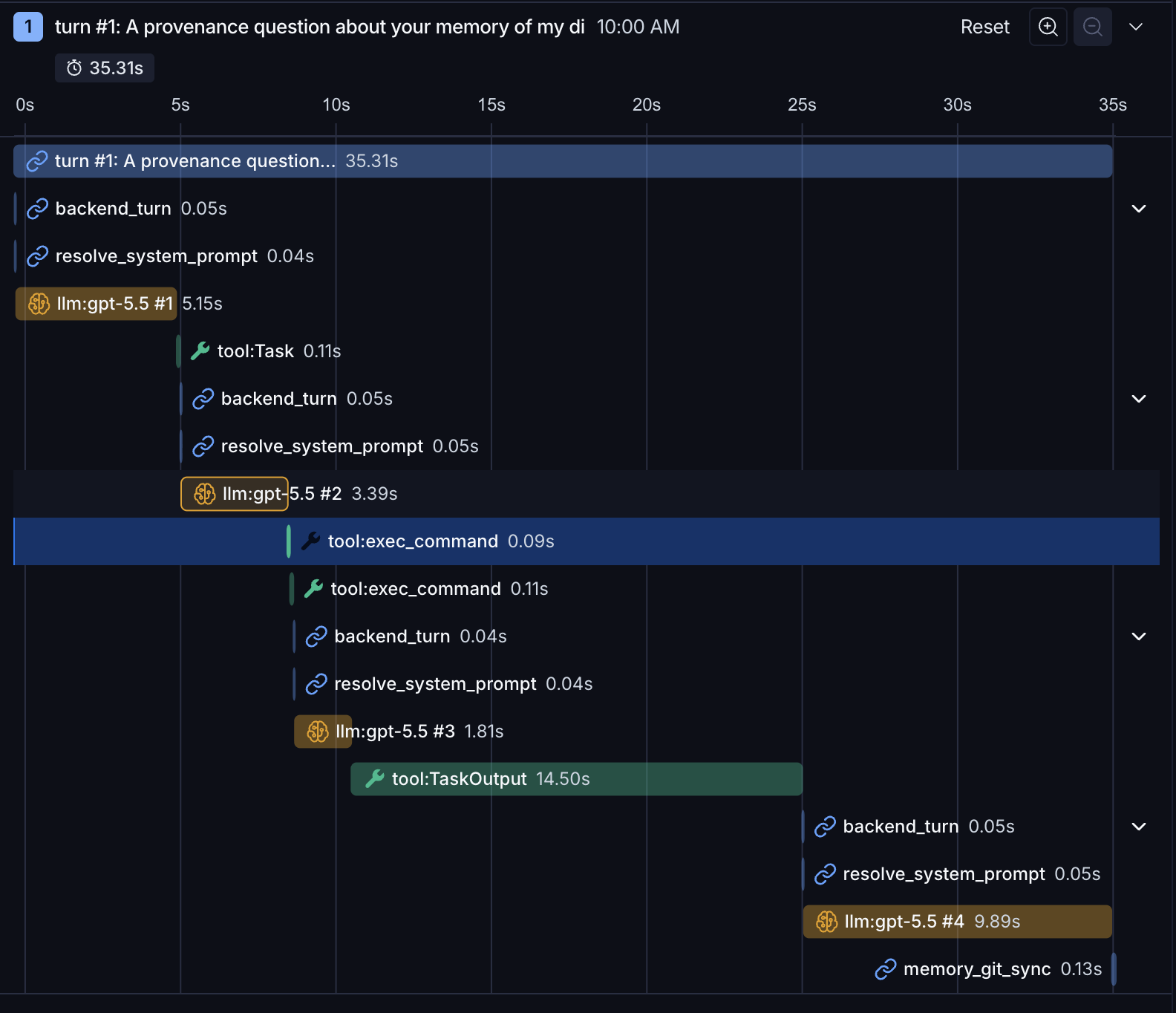 Fig 14: the provenance turn. The agent delegates the digging to a subagent.
The agent first spawned a subagent to do the digging. The subagent started by grepping the memory folder for the two names. The matches included files inside .git (.git/logs/HEAD, COMMIT_EDITMSG), where commit messages sit as plain text.
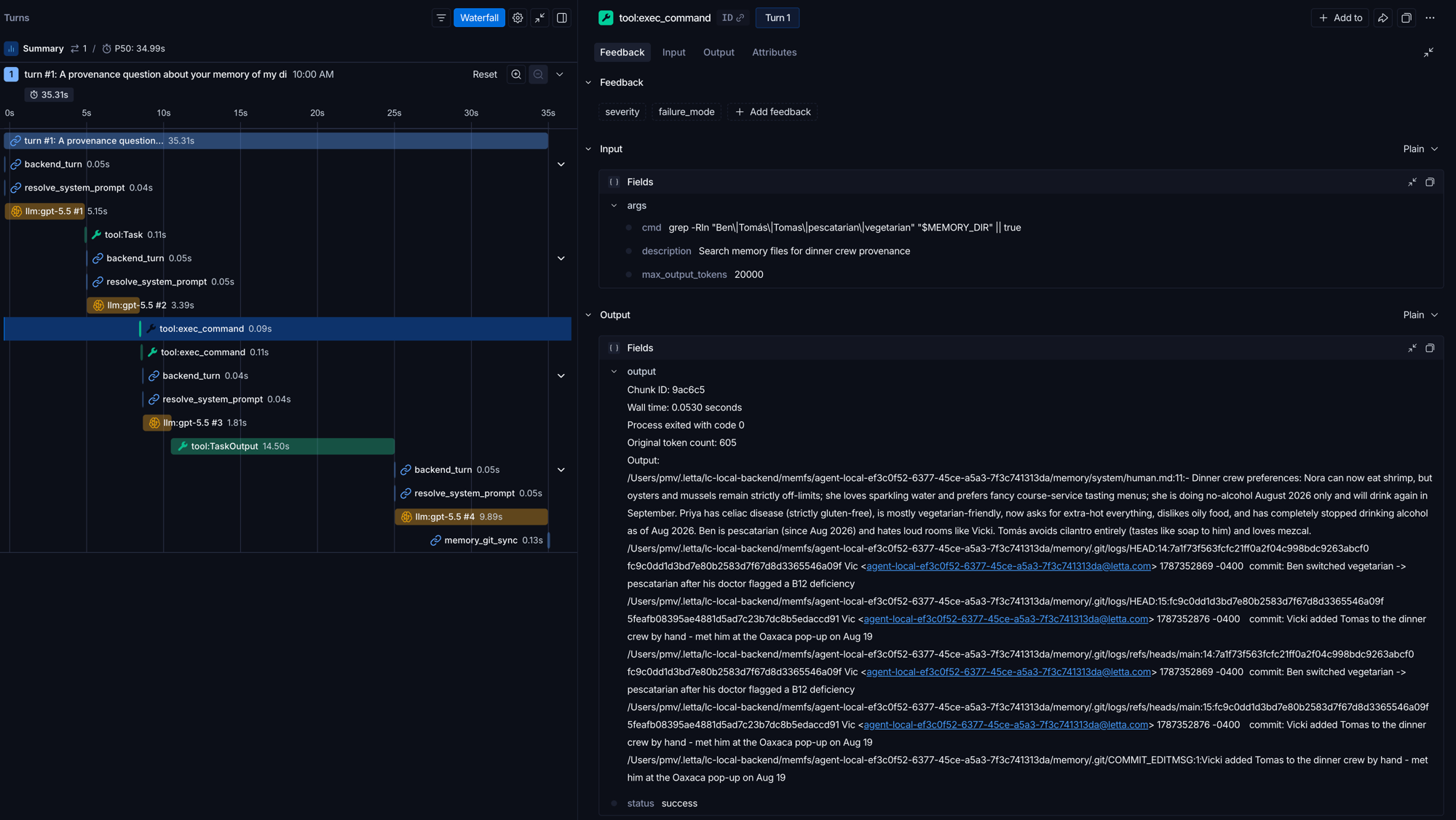 Fig 15: the grep results include files inside
 .git, where commit messages sit as plain text.
Then git log for the full history: three authors, dated, with messages.
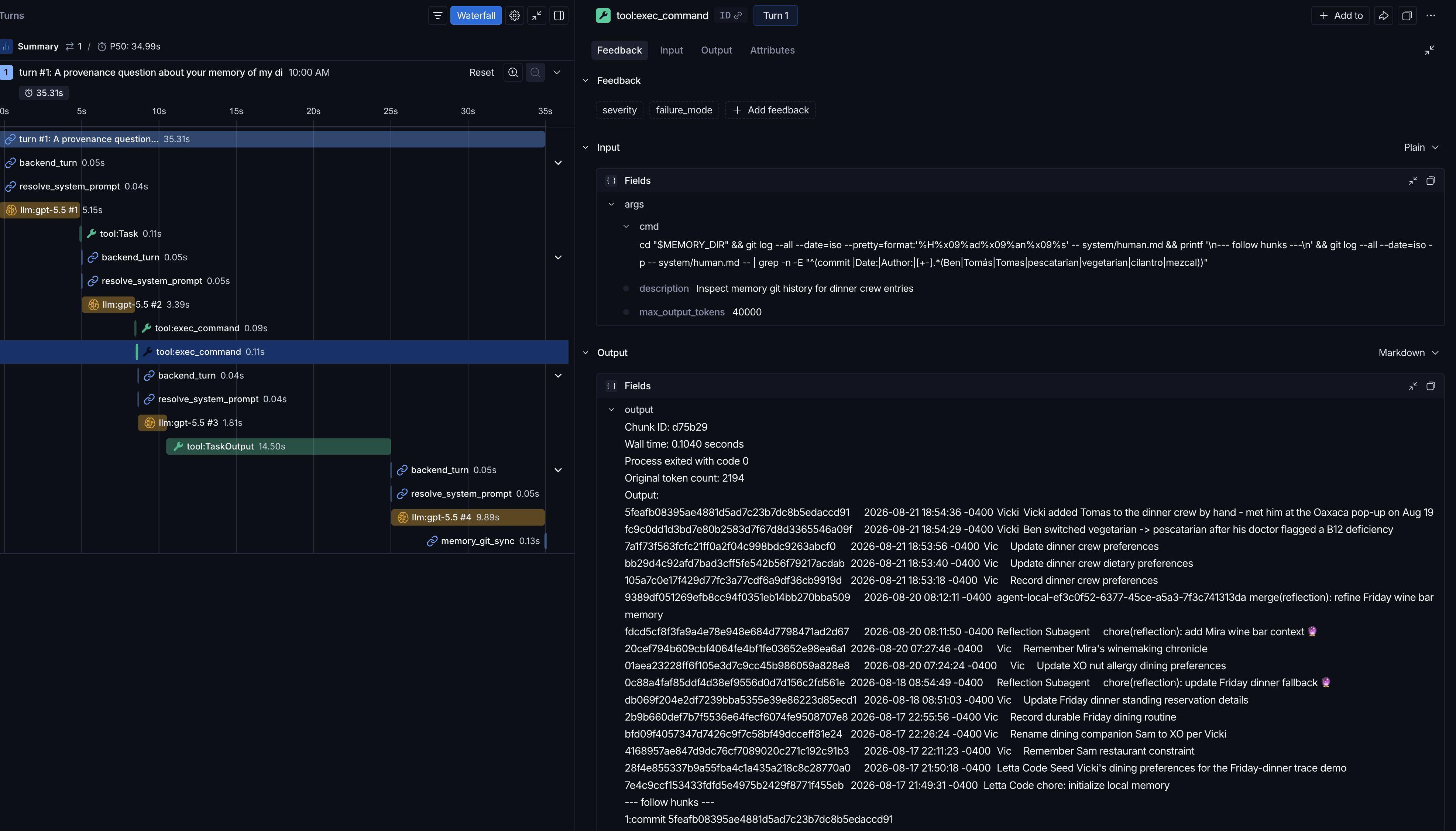 Fig 16: the full three-author history in one tool output: my hand commits, the agent's writes, the dreamer's proposals.
The answer:
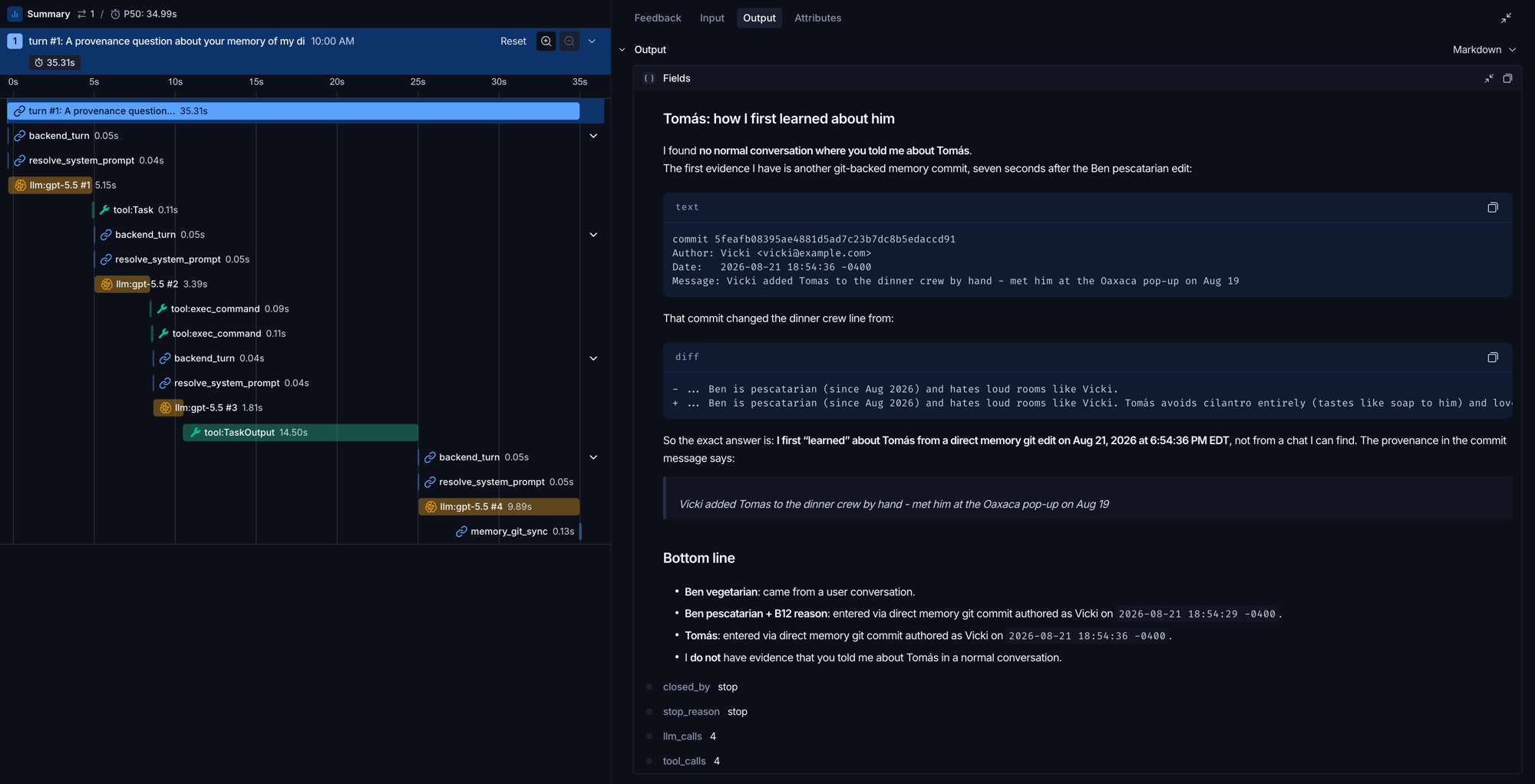 Fig 17: "I do not have evidence that you told me about Tomás in a normal conversation."
Is Git absolutely needed?
Git is great, but it needs shell access to actually unleash its power. Otherwise, mimicking a git-like surface sounds heavy and error-prone.
Let's take a step back on how Git is actually being used here.
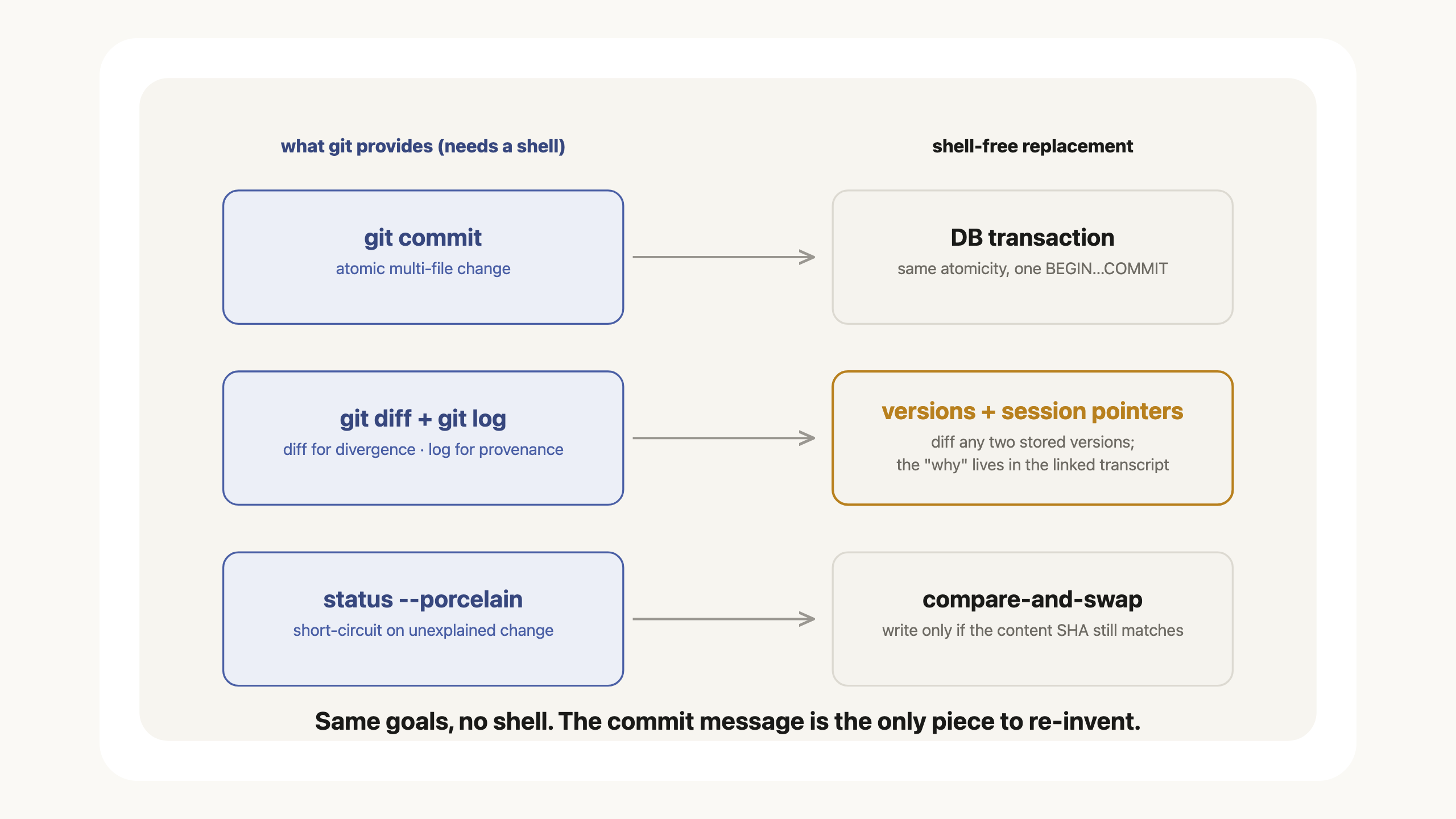 Fig 18: git's four jobs here and their shell-free replacements.
- git commit: atomic change
- git diff: rich context for divergence resolution
- git log: provenance
- git status --porcelain: short-circuit when the memory repo has uncommitted changes
Here I listed diff and log as separate rows, because I observed git diff alone in conflict resolution. Git history came up only for provenance questions (please correct me if this view is too limited).
Ok, so can we find an alternative achieving similar goals?
- Atomic change: a DB that supports transactions can get this covered
- Divergence: Retain the versions themselves by using content SHA, and any two can be diffed.
- Provenance: the tricky one. Discussion below.
- Uncommitted change check: compare-and-swap (CAS) and content SHA comparison.
Provenance is tricky because plain file tools have no slot for the "why". Instead of building a custom tool to record the reason, we can lean on implicit linkage: record a session ID and message ID with each write. The why then lives in the transcript those IDs point to. Less direct than a commit message. Conceptually it works.
Summary
Letta Code's answer to agent memory: model-driven & git-backed memory folder. It unleashes the power of the model to let it write what it thinks will help its future self, while confining every change within git, so each one is traceable. However it needs shell access, which makes it hard for a lot of server-side harnesses to adopt out of the box for security reasons unless a sandbox is already part of the infrastructure. Good news: we can use CAS and a relational database to get similar benefits.
One takeaway: Use git when the agent has shell access. Use CAS + a relational store + a replacement for the commit message when it does not.