Project for 'Built with Opus 4.6' Claude Code x Cerebral Valley hackathon
Grateful to be picked as one of 500 vibe coders from 13K applicants. Cool to have met fellow builders and learned from them. It was a lot of fun.
Our bathroom has mold — the kind where friends gently suggest that maybe that's why we're always tired. Hiring a contractor was inevitable, but the design part? Out of budget. Plus, I've always loved flipping through Architectural Digest and imagining what I'd do with a space. So when the Built with Opus 4.6 hackathon opened up, I built the tool, something I had been thinking about but hadn't gotten around to.
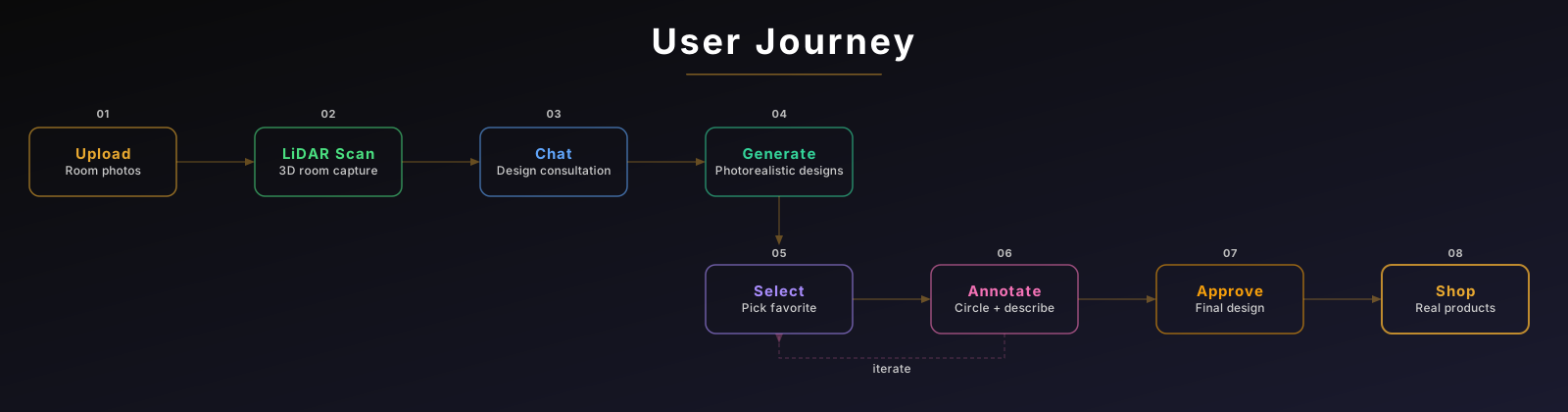
Remo is an iOS app where you photograph your room, scan it with LiDAR, chat with an AI design consultant, get photorealistic redesigns, iteratively refine them by annotating what you want changed, and walk away with a shoppable product list. Photo to purchasable product list, all AI-orchestrated.
Here's what I learned building it.
Architecture
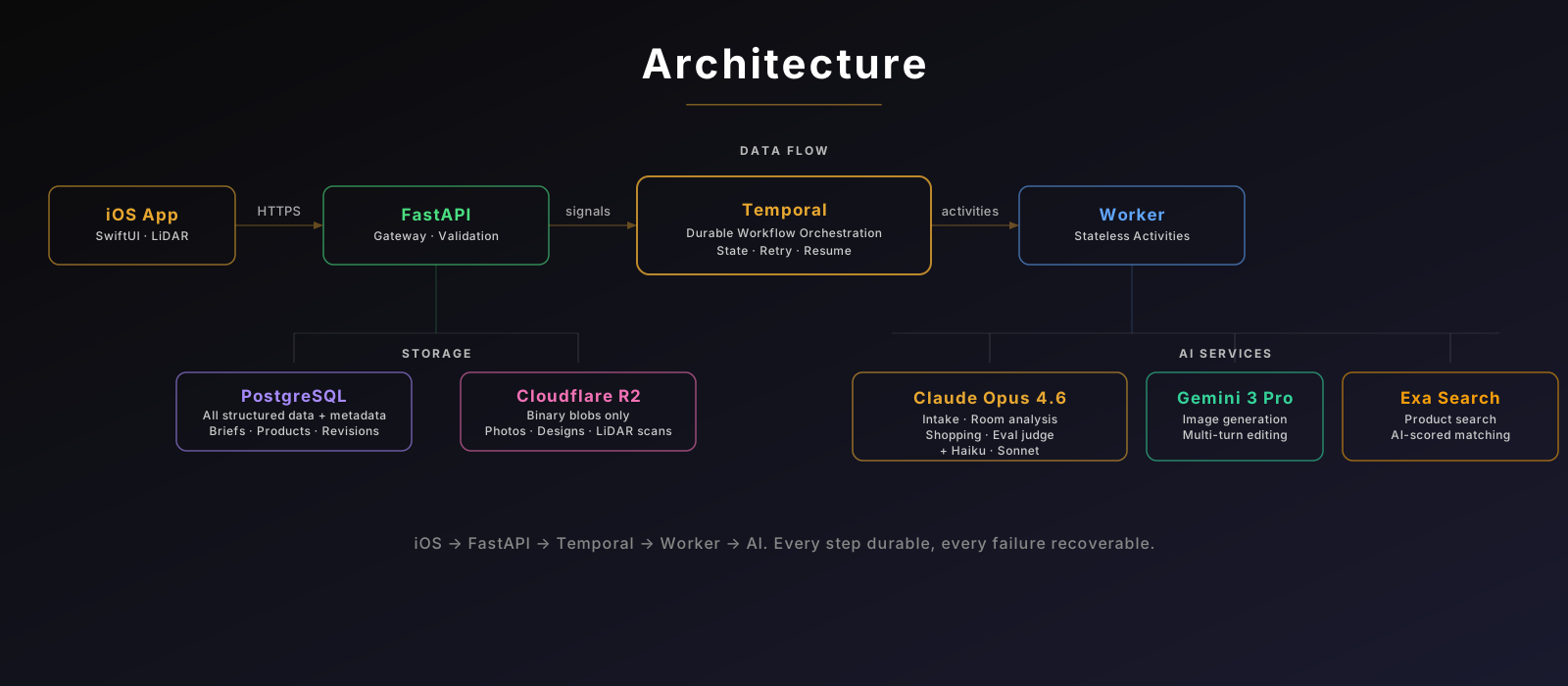
| Model | Role |
|---|---|
| Claude Opus 4.6 | Intake chat, room analysis, shopping extraction, VLM eval judge, intake eval judge |
| Claude Sonnet 4.5 | Scoring products found in search step |
| Claude Haiku 4.5 | Photo validation (is this a room photo?) |
| Gemini 3 Pro Image | Image generation, multi-turn editing |
One Temporal workflow per design project. The user's journey — upload photos, scan the room, chat about style, generate designs, annotate changes, approve, get a shopping list — is one long durable execution. If Gemini times out mid-generation, Temporal retries automatically. If the user closes the app and comes back tomorrow, their progress is still there. If they abandon entirely, a 48-hour timeout auto-purges the entire project from R2 and the database. No cron jobs. No orphaned data.
The key architectural rule: AI calls only happen in activities (except one sync photo validation in the API). Workflow handles orchestration. Activities are stateless — a deliberate trade-off. Every activity re-fetches what it needs (re-downloading images from R2 on every retry) instead of caching in memory. That costs extra I/O, but it buys durability: if a worker crashes mid-generation, Temporal retries the activity on any available worker with zero state to reconstruct. I chose reliability over efficiency because the expensive part is the AI call, not a second image download.
This separation also meant I could swap Gemini model versions, change prompt strategies, and add entire pipeline stages without touching the workflow state machine. Tests across backend and iOS verify this contract holds.
"Read the Room!" — Eager Analysis
Users spend 30-60 seconds on the LiDAR scan. Dead time for the server. So while they walk around, Claude Opus reads their photos and builds a design hypothesis — room type, furniture inventory (keep or replace?), behavioral signals ("toiletries everywhere" → "needs concealed storage"), and where the biggest opportunity lives.
Result: the AI's first question isn't "what style do you like?" — it's "I notice you have no concealed storage — is that a pain point?"
The workflow fires this via asyncio.shield() concurrently with the scan. Opus is thorough, so it sometimes finishes after the user. If it fails entirely? Blank-slate conversation. Less intelligent first question, no crash.
The Intake Agent: Not a Form. A Design Brain.
Most AI apps ask you to fill out a form. Remo has a conversation. The agent asks about your room, references what it saw in the photos, and translates vague language ("I want it cozy") into professional design language ("warm 2700K ambient lighting with layered textiles"). Say "I want it cozy" and the agent dynamically loads style-specific knowledge — proportions, material palettes, signature elements — into its next response.
Behind this is a 243-line system prompt encoding three layers of interior design theory: Francis Ching's spatial foundations, Elsie de Wolfe's human-centered refinement, and Dorothy Draper's emotional impact principles. I didn't know any of these names before building Remo. A designer friend pointed me to the icons, and I spent hours having Claude give me a crash course on the domain — while Claude Code was Ralph-looping Maestro UI tests on the side.
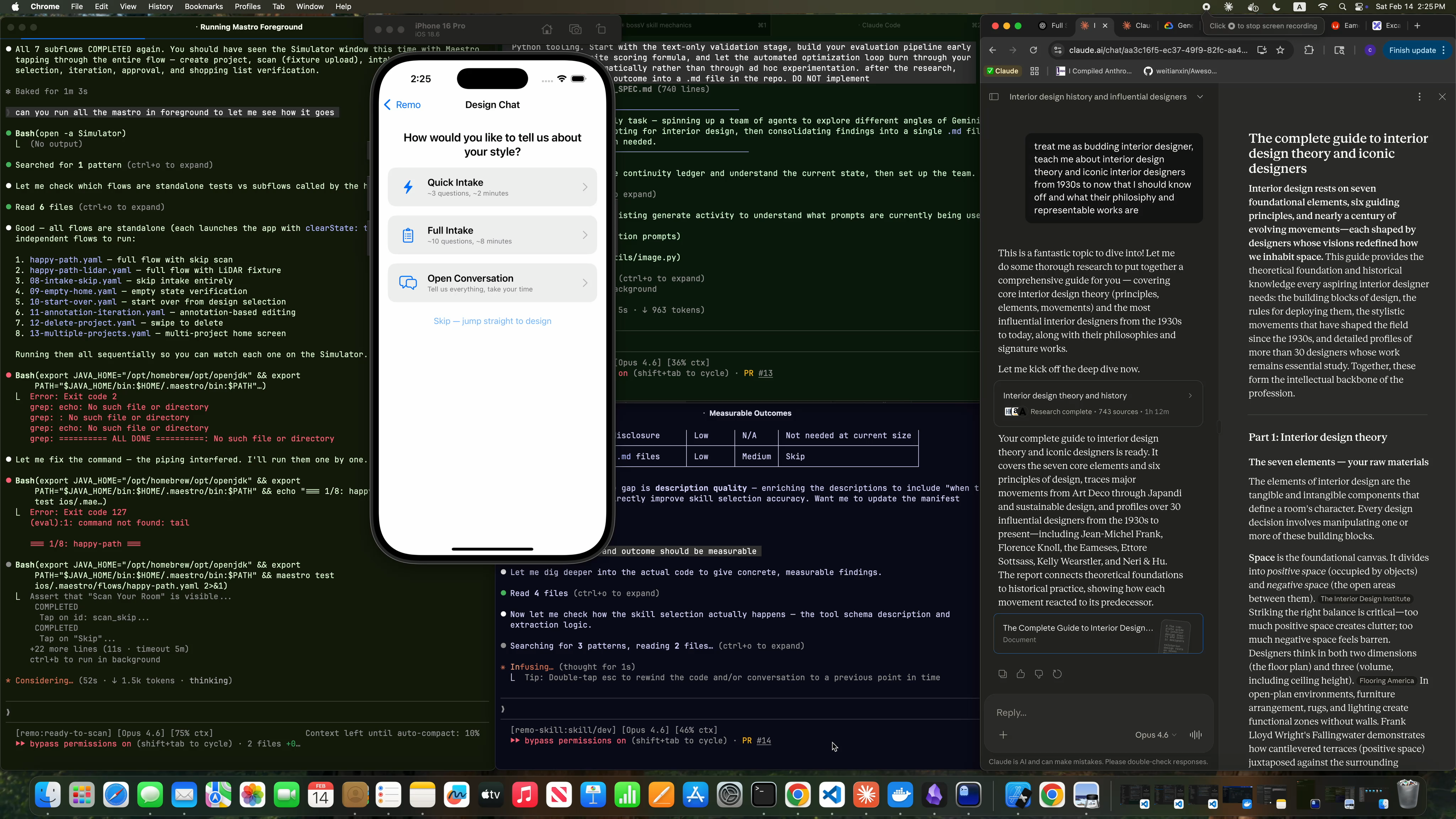
The constraint that makes it work: the agent can only do two things each turn — ask a question or produce a design brief. No free-form rambling. Every turn either gathers information or delivers a result. When the turn budget hits 1, the prompt literally says: "This IS your last chance — draft the best brief you can."
The output is a DesignBrief — room type, pain points, keep items, lighting with Kelvin temps, colors with 60/30/10 proportions, textures as material descriptors, lifestyle patterns, emotional drivers. Every field translates directly into the image generation prompt. The conversation streams to the iOS client via SSE in real-time, so the user watches it appear word by word.
The Annotation Circle: What Multimodal Models Taught Me About Data
Users circle areas they want changed. I was trying to be smart, adding annotations into the input picture. Consequently, Gemini kept those circles in the redesigned image.
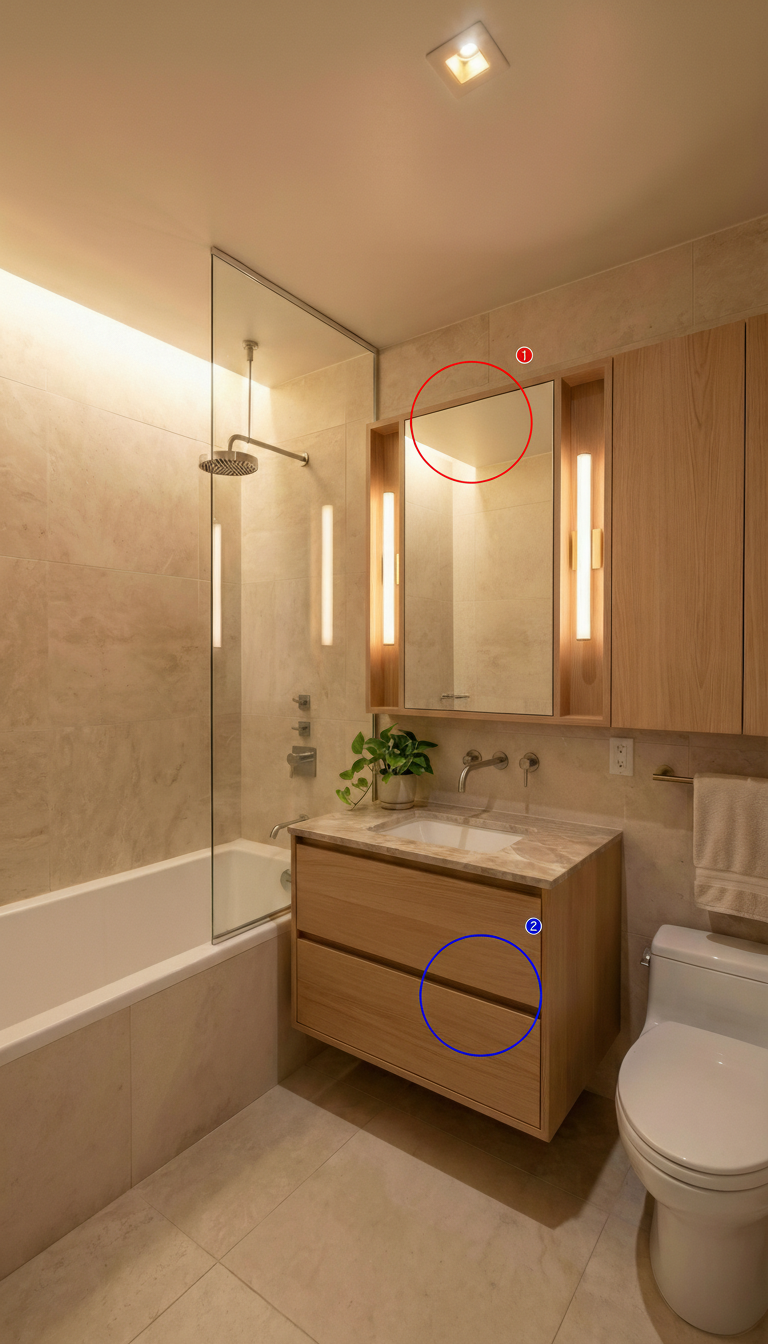
My first instinct was to fix the prompt. "Ignore the annotation markers." "The circles are instructions, not content." "Do NOT reproduce any overlay elements." Seven versions of increasingly desperate wording. None of them worked.
The learning: in image generation, visual signals override text instructions. Telling Gemini "ignore the circles" created a contradiction — the pixels said "circles are here" while the prompt said "pretend they're not." The model couldn't reliably distinguish between "annotation that the user drew" and "decorative element on the wall" because both were just pixels in the input image.
The fix wasn't better wording. It was changing the data representation entirely — stop sending visual annotations, switch to text coordinates: "Region 1: upper-left area of the image (30% from left, 40% from top, medium area) — ACTION: replace — INSTRUCTION: replace the dated vanity with a floating modern one". No more conflicting signals. Problem gone. The VLM eval's artifact_cleanliness score confirmed the fix quantitatively.
The broader takeaway: when your text prompt and your image contradict each other, the image wins. So don't fight the model — change the input.
The Eval Pipeline: Measurement Over Intuition
How do you know if a generated room redesign is any good? You "look" at it.
I built a VLM judge — Claude Opus 4.6 scores every generated image against a 100-point rubric with 9 criteria. Room preservation gets the highest weight (20/100), because if the AI turns your room into a completely different room, that's useless no matter how pretty it is.
25 versioned prompt files across three tracks (generation, edit, shopping). A/B testing generates 5 images per version, scores each, then runs 10,000 bootstrap resamples on those 10 scores — small sample, heavy statistical lifting — and returns a SHIP, LIKELY_BETTER, INCONCLUSIVE, or ROLLBACK verdict. Cost per eval: ~$0.02.
Generation prompt v1 was 15 generic lines. By v5, it references Canon EOS R5 camera characteristics — because that's what makes renders look like photographs instead of AI slop.
The rollback story: I shipped room_preservation v5 — LiDAR-aware dimensional constraints. The original eval said "LIKELY_BETTER — SHIP." Then I upgraded the judge from Sonnet 4.5 to Opus 4.6 and built a proper rubric. The stronger judge scored v5 worse than v4 on spatial accuracy. Rollback was one line in a JSON config.
The lesson: measure your measurement tool too. A weak judge had approved a regression that a stronger judge caught.
The Shopping Pipeline: 5 Steps, 24 Retailers, Real Products
The shopping pipeline extracts items from the approved design (Claude vision), builds multi-query search strategies per item, runs dual-pass Exa searches (retailer-constrained pass + open web), scores candidates with a category-adaptive rubric, and assembles the final list.
28 color synonyms expand search recall — "sage" also searches "muted green," "olive," "eucalyptus." 24 curated retailer domains anchor the first pass. A flag-don't-gate philosophy: if a product's dimensions might not fit the LiDAR-measured space, it gets a warning badge, not silent removal. Your room, your call.
The whole pipeline streams results via SSE with a 3-second handoff protocol between the Temporal workflow and the API process — if the iOS client is connected and polling, it claims streaming ownership and delivers products in real-time. Otherwise, the workflow runs shopping as a standard Temporal activity and the user sees results all at once.
Behind the Scenes: The Demo Video
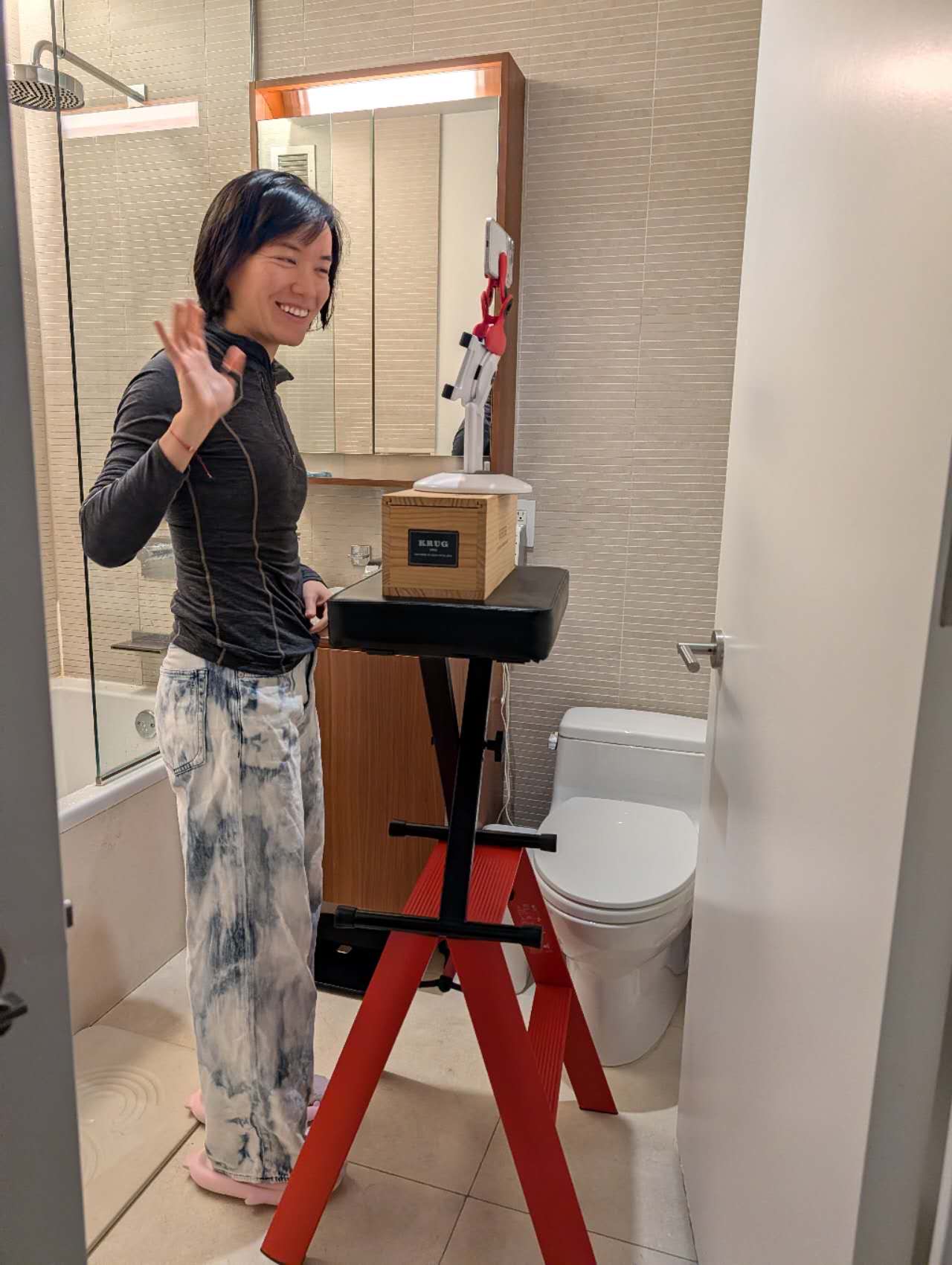
Claude Code co-produced the demo video — 25 SVG overlays from text prompts, burned them into clips via ffmpeg, planned the shot list, drafted voiceover scripts. Even with Claude Code's help, I only managed to submit without voiceover, 2 minutes before deadline. Finished beats perfect. Though I felt a bit disappointed in my video editing fluency - time to shake it off, just means more deliberate practice!
Next Steps
-
Latency — The current workflow takes 15min (raw demo video here). To me, it feels way too long. Frankly, I am not sure how to cut down the latency in image generation. Need to do more research.
-
Search relevance — Better ranking signals and visual similarity to close the gap between design and purchasable products. I truly do not enjoy shopping all night for renovation things where style and measurement both matter and ended up with sore eyes and an empty shopping cart.
Takeaway
Durability
A good prompt means nothing if the system around it can't retry failures, survive user abandonment, or stream results in real-time. The prompts are maybe 30% of the work. The other 70% is making them reliable at scale.
Enclosed feedback eval loop
The eval pipeline isn't just for me to check results — it's what lets Claude Code iterate on prompts autonomously. Give it a high-level guideline and an eval rubric, and it can tweak a prompt, run the eval, read the scores, adjust, and try again. That's how 25 prompt versions happened without 28 manual review sessions. Some shipped. Some rolled back. The loop catches regressions that neither I nor the AI would notice in a single pass.
Spec
Spec is worth investing your time in, even though it means that the coding will start late. It helps you to think deeper, to reflect whether something is worth building, how it should behave, what should be non-negotiable.
My Go-to claude code features
Agent Team
I like using a team of agents on research and gap analysis tasks.
Ralph-loop
Eventual close-enough perfection right? Just like life.